Overview of Changes
STRUCTURE
New Features & Improvements
-
Workspace Readiness Controls
- Production deployment is now disabled until workspace setup is fully complete, preventing premature activation
- Clear error messages now appear when workspace configuration issues occur, making troubleshooting faster and easier
-
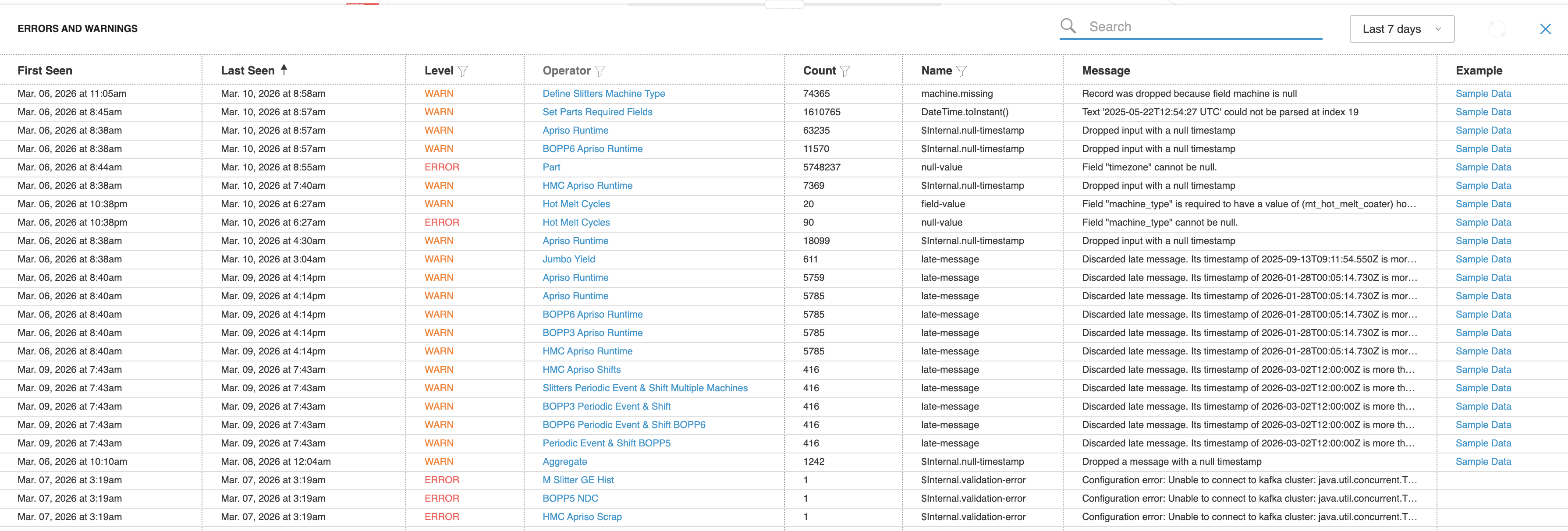
Pipeline Error Management
- Errors now display when they were last detected, helping you prioritize recent issues
- Older resolved errors automatically clear from view, reducing clutter and confusion
- Improved Production Deployment Reliability
- Production deployments now complete successfully even in high-load environments
- Eliminates timeout issues when activating production configurations
- Ensures consistent deployment experience across all system conditions
Bug Fixes
-
Workspace Merge Performance
- Workspace merge operations now complete significantly faster, reducing wait times from over 2 minutes to seconds
- Enables faster iteration when combining and updating workspace configurations
-
Pipeline Deployment Linking
- Pipelines now correctly link to previous deployments when no changes have been made since the last merge
- Resolves issue where unchanged pipelines were incorrectly treated as modified during merge operations
-
Post-Deployment Page Loading
- Pages now load correctly immediately after system updates without requiring a manual refresh
- Ensures the latest version of the application is always displayed after deployments
-
Pipeline Statefulness Visualization
- Deployed pipelines now correctly highlight stateful operations in the visual workflow diagram
- Easier identification of which operations maintain state across data processing
-
Shift Scheduler Reliability
- Resolved an issue that could cause errors when shift scheduling data was unavailable
- Improved system stability during shift management operations
ANALYZE
New Features & Improvements
- Widget Loading Error Handling
- Widgets now display clear error messages instead of showing an endless loading spinner when data cannot be retrieved
- Improved visibility into dashboard issues so you can take action instead of waiting indefinitely
Bug Fixes
-
Production Date Retrieval
- Resolved an issue where production start dates were not being retrieved correctly when no specific asset was selected
- Ensures accurate production timeline information is displayed across all views
-
Machine Display Names in Charts
- Charts and legends now consistently show machine display names instead of internal identifiers
- Easier to identify and track specific machines across all visualizations
-
Line Field Picker Display
- Fixed an issue where the field picker in Line model views only displayed KPI fields
- All available fields now appear correctly in the field picker for comprehensive data analysis
-
Invalid URL Error Handling
- Navigating to an incorrect page address now displays a proper error page instead of a blank screen
- Improved clarity when accessing pages that don't exist
-
Data Table sagas cleanup
- Little floppy button not doing anything Saga code very messy needs cleanup Please see the description in the PR:
-
Production Calendar Messaging
- Improved the production calendar warning to be less intrusive with a subtle tooltip
- Calendar remains enabled by default with a clear indication that configuration may be needed for accuracy
- Streamlined date and time selection interface for better usability
-
Widget Decimal Formatting
- Fixed an issue preventing users from adjusting decimal places in dashboard widgets
- Number formatting controls now work correctly across all widget types
OPERATE
New Features & Improvements
-
Breakdown Reason Codes
- Improved accuracy when categorizing unplanned downtime events
- Eliminates duplicate reason codes to ensure cleaner, more reliable reporting
-
2D View Field Display Toggle
- Toggle status information on or off above machines in 2D view
- Declutter your factory floor visualization when detailed status isn't needed
- Quickly switch between detailed and simplified views
-
Data Source Configuration
- Configure and manage data sources directly through the interface
- Streamlined setup process without manual configuration files
- Visual controls for connecting production data to your workspace
Bug Fixes
-
Session Availability Display
- Fixed an issue where available sessions were incorrectly shown as unavailable in OPERATE
- Session status now displays accurately, ensuring users can access sessions when they are truly available
-
2D/3D Toggle Visibility
- Fixed an issue where the 2D/3D view toggle would overlap the close button on the recommendations panel
- The toggle now automatically hides when recommendations are displayed, ensuring all controls remain accessible
-
3D View Loading
- Resolved an issue where switching from 2D to 3D view would fail to load the 3D model properly
- 3D models now render correctly on first load, regardless of which view is opened first
-
Data Source Display Configuration
- Data sources now display correctly across machines, even when configured for different machine sources
- Improved flexibility in configuring which data sources appear on each machine
-
Failure Mode Cause Options
- Corrected the available options when selecting failure mode causes
- Ensures accurate root cause tracking and reporting
-
Data Sources View Stability
- Resolved an issue where accessing data sources for specific production lines would cause the application to crash
- Data sources now load reliably through both navigation and direct access
-
Recommendation Page Stability
- Fixed an issue where the recommendations page would crash when encountering unexpected data
- Recommendations now display reliably even when errors occur
-
Reason Codes Direct URL Access
- Fixed issue preventing reason codes configuration from loading when accessed directly via URL
- Ensures reliable access to reason codes setup from bookmarks or shared links