- Print
- DarkLight
API
- Print
- DarkLight
API Keys
Overview
This section provides a demonstration of the capabilities of FactoryTX. You will configure the three major components of FactoryTX to initiate data acquisition from two different data sources. You will be using the FactoryTX UI for all the configuration requirements. You will also need access to a Sight Machine cloud environment if you want to see raw data transmitted to the platform (ask your Sight Machine contact for details). The guide uses sample data from an imaginary manufacturing startup that specializes in safari park vehicles. Given the nature of modern auto manufacturing, the supply chain is distributed all over the globe and raw data is stored in the cloud. The data is stored using two services, each with data related to different manufacturing processes. FactoryTX will be configured to collect data from an MS SQL Server and an Azure Data Lake, apply some light data transformations, and upload data as records to a Sight Machine cloud instance.
Getting an API key
FactoryTX and the Sight Machine Manufacturing Data Platform (MDP) use secure authentication to verify the identity of the raw data source. In order to initiate the data upload process, an Edge API key will need to be generated and saved to the FactoryTX configuration.
Edge API keys are created and managed in MDP. To view and manage them, navigate to your MDP web UI in a browser.
Select Factory CONNECT from the Platform navigation menu.

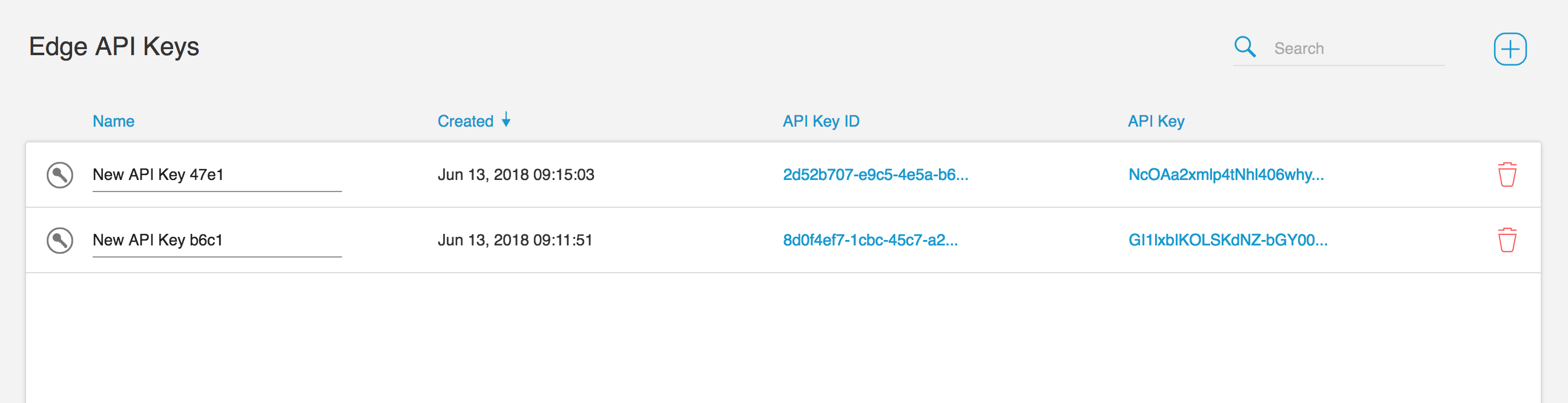
A list of Edge API keys will be displayed in the table. To create a new key, select the + icon in the upper right corner of the UI.
Running FactoryTX
There are a few ways to run FactoryTX:
- locally with docker-compose;
- on an appliance (IPC) managed by Sight Machine;
- on a FactoryTX Virtual Machine (VM) managed by Sight Machine;
- in Kubernetes (i.e. FactoryTX Cloud)
If you don’t have access to a working FactoryTX installation, please refer to the guide on setting up Local FactoryTX with Docker Compose.
Otherwise, please navigate to the FactoryTX Configuration Editor.
Configuring FactoryTX
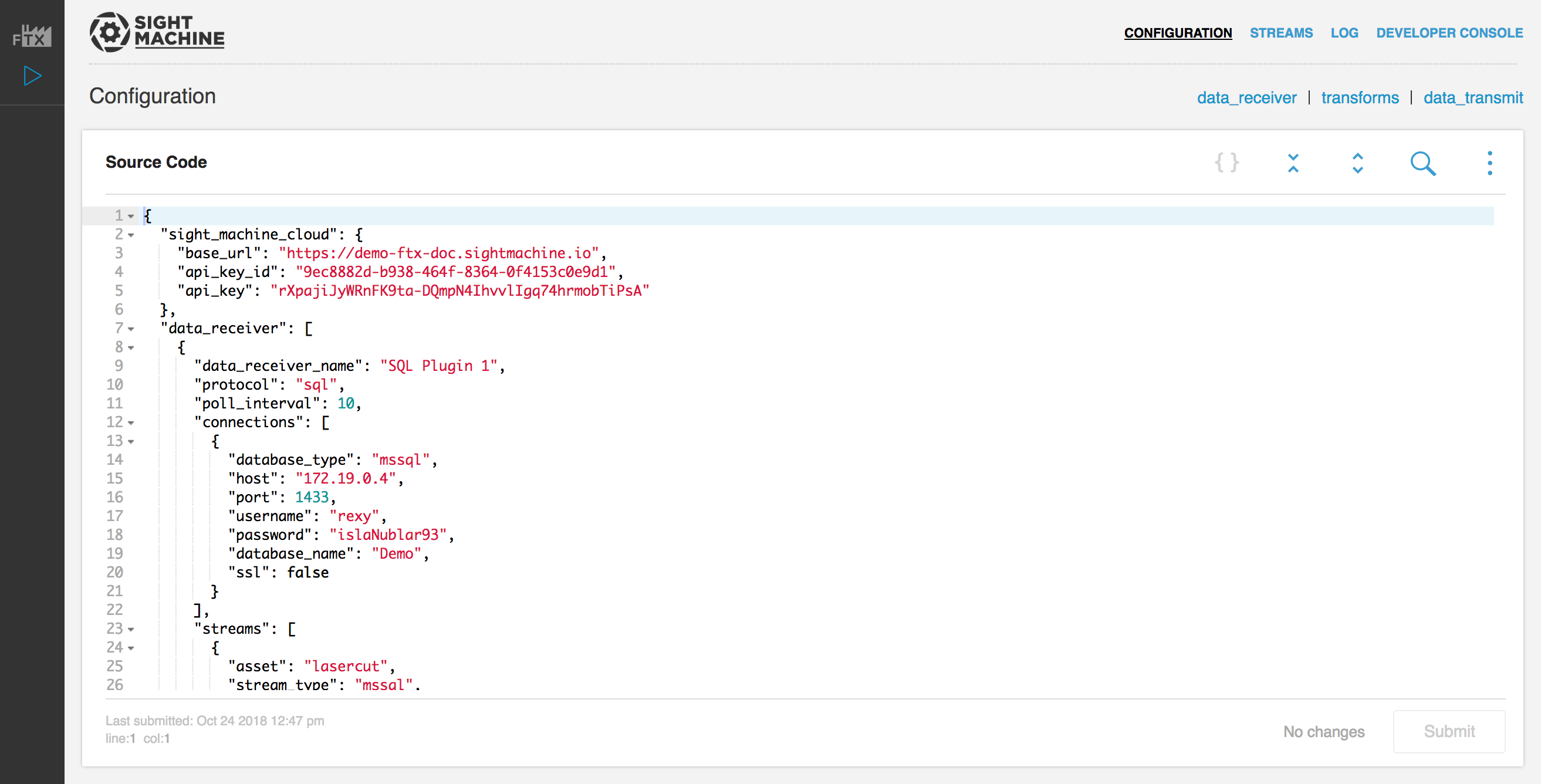
In the Configuration Editor, replace the existing configuration with the following configuration:
{
"data_receiver": [
{
"data_receiver_name": "SQL Plugin 1",
"protocol": "sql",
"poll_interval": 10,
"connections": [
{
"database_type": "mssql",
"host": "35.233.132.166",
"port": 1433,
"username": "rexy",
"password": "islaNublar93",
"database_name": "Demo",
"ssl": false,
"connection_name": "Nedry"
}
],
"streams": [
{
"asset": "lasercut",
"stream_type": "mssql",
"state_fields": [
{
"column_name": "timestamp",
"data_type": "timestamp",
"initial_value": "2018-10-22 10:29:00"
}
],
"query": "SELECT * FROM ca_lasercut\nWHERE timestamp > :timestamp\nORDER BY timestamp;"
},
{
"asset": "diecast",
"stream_type": "mssql",
"state_fields": [
{
"column_name": "TIMESTAMP",
"data_type": "timestamp",
"initial_value": "2018-10-22 12:29:00"
}
],
"query": "SELECT * FROM hk_diecast\nWHERE TIMESTAMP > :TIMESTAMP\nORDER BY TIMESTAMP;"
},
{
"asset": "fusion",
"stream_type": "mssql",
"state_fields": [
{
"column_name": "timestamp",
"data_type": "timestamp",
"initial_value": "2018-10-22 02:28:00"
}
],
"query": "SELECT * FROM tl_fusion WHERE timestamp > :timestamp ORDER BY timestamp;"
}
]
},
{
"data_receiver_name": "azure_receiver_1",
"protocol": "azure_data_lake",
"poll_interval": 5,
"connections": [
{
"tenant_id": "beb1d7f9-8e2e-4dc4-83be-190ebceb70ea",
"client_id": "b8d454e3-67ec-4f2f-8dcb-a5d6f87abbc6",
"client_secret": "BdgGBpZ7pS.Ogf..7PpT0JVLXes.i1uh",
"store_name": "factorytxreceivertest",
"data_directory": "directory-1",
"max_files_per_request": 1,
"connection_name": "Blue"
}
],
"parsers": [
{
"parser_name": "CSV_Parser_1",
"parser_type": "csv"
}
],
"streams": [
{
"asset": "spraypaint",
"stream_type": "azure_lake",
"file_filter": [
"*.csv"
],
"parser": "CSV_Parser_1"
}
]
}
],
"transforms": [
{
"transform_name": "Rename 1",
"transform_type": "rename",
"filter_stream": [
"diecast:mssql"
],
"renames": [
{
"from": "TIMESTAMP",
"to": "timestamp"
}
]
},
{
"transform_name": "Rename 2",
"transform_type": "rename",
"filter_stream": [
"spraypaint:azure_lake"
],
"renames": [
{
"from": "Timestamp",
"to": "timestamp"
}
]
},
{
"transform_name": "Time Converter 1",
"transform_type": "convert_timestamps",
"filter_stream": [
"spraypaint:*"
],
"field_names": [
"timestamp"
],
"timezone": "Asia/Tokyo"
},
{
"transform_name": "Time Converter 2",
"transform_type": "convert_timestamps",
"filter_stream": [
"lasercut:mssql"
],
"field_names": [
"timestamp"
],
"timezone": "America/New_York"
},
{
"transform_name": "Time Converter 3",
"transform_type": "convert_timestamps",
"filter_stream": [
"diecast:mssql"
],
"field_names": [
"timestamp"
],
"timezone": "Asia/Hong_Kong"
},
{
"transform_name": "Time Converter 4",
"transform_type": "convert_timestamps",
"filter_stream": [
"fusion:mssql"
],
"field_names": [
"timestamp"
],
"timezone": "Europe/Paris"
}
],
"data_transmit": [
{
"transmit_name": "MyTransmit_1",
"transmit_type": "remotedatapost"
}
]
}IMPORTANT: You’ll need to configure SM Cloud Credentials with values that you generated in your MDP environment. Please refer to the Getting an API key section for reference on how to create API keys.
In the exemplified configuration file, FactoryTX is collecting data from our international factories from two remote data sources: an MS SQL Server and an Azure Data Lake instance.
The MS SQL Server has three tables in the Demo database that we want:
- “ca_lasercut”: The table contains information from 6 laser cutting machines at our factory in Carmel, Indiana. These machines create molds for our car parts.
- “hk_diecast”: The table contains information from 3 die casting machines at our factory in Hong Kong, China. These machines pour molten compounds into the molds created by the laser cutting machines.
- “tl_fusion”: The table contains information from our 1 fusion machine at our factory in Toulouse, France. The fusion machine assembles the separate parts into the whole car.
The Azure Data Lake instance has CSV files of data from our machines in Tokyo, Japan, which apply a few coats of spray paint to the exterior of our cars.
Before transmitting the data to the Sight Machine cloud, FactoryTX will apply some light data transformations, such as renaming a SQL table column and converting timestamps into the factory’s time zone.
To get more details about the configuration file and what each of its sections mean, please refer to the Receivers and Transforms and Transmits article.
Click the submit button in the FactoryTX Controller to save the configuration and FactoryTX will automatically begin collecting, transforming, and transmitting data to the Sight Machine cloud.
Obtaining your API Key and Secret
Your API key and secret serve as your username and password for connecting to the Sight Machine database.
To obtain your API key and secret, do the following:
Go to your User Profile page, which you can access from the menu located in the top right.
.png)
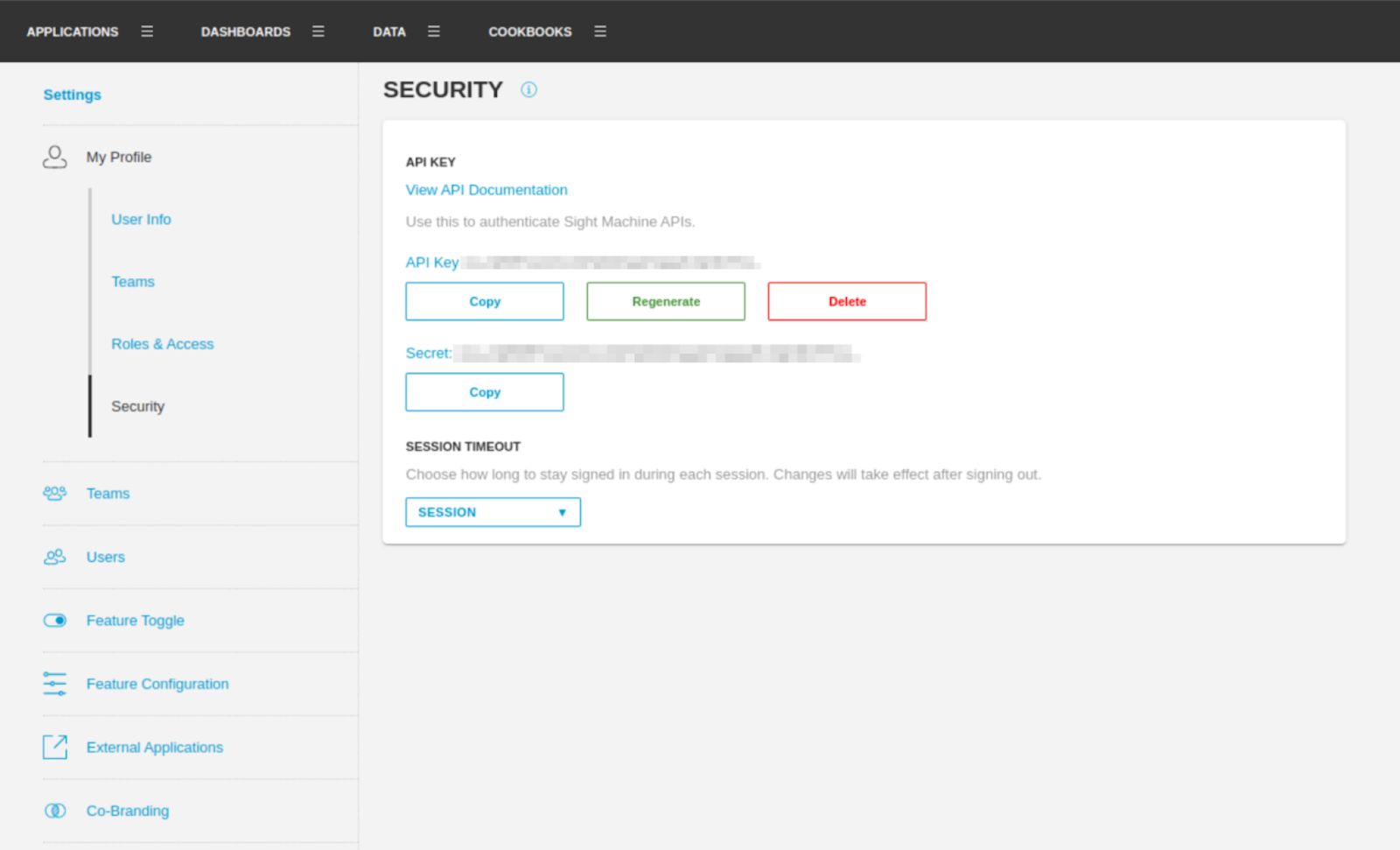
Scroll down to the Security section. Do one of the following:
Click Create API Key to create a new API Key.
View an already existing API key and secret.
.png)
You can either copy your API key and secret from this page or generate a new set if needed.
API Documentation
API Documentation is available in-product from your Profile page after creating an API Key.
.png)
Rest API
General Response Format
API Versioning
The major API version should be included in the url. This signifies major differences in endpoints used by the front-end. The minor API version should be included in the response headers and database objects for debugging. All minor version changes are compatible with the same major version parser.
Status Wrapper
The API should automatically wrap responses in a common format that allows us to read error state information from the back-end and determine when there is a valid response to parse. All responses are returned in JSON format (Content-Type: application/json).
Example Successful Response
HTTP/1.1 200 OKContent-Type: application/json{ "success": true, "response": {}}Example Failure Response
HTTP/1.1 200 OKContent-Type: application/json{ "success": false, "response": {}, "error": { "code": 81, "text": "TypeError: <Response 263 bytes [302 FOUND]> is not JSON serializable" }}config (GET)
GET /v1/config
Returns FactoryTX configuration settings as JSON.
Example Request
GET /v1/config HTTP/1.1Example Success Response
{ "response": { "data_receiver": [ { "data_receiver_name": "localfile_0", "protocol": "localfile", "streams": [ { "asset": "ArmRobot_1", "stream_type": "cycle", "file_filter": [ "*.csv" ] } ], "connections": [ { "root_path": "/data/demorobotdata" } ], "parsers": [ { "parser_name": "csv_0", "parser_type": "spreadsheet", "filter_stream": [ "*" ], "options": { "localtz": "Asia/Ho_Chi_Minh", "parse": { "separator": ",", "parse_timestamps": [ { "field_name": "timestamp", "format": "%Y-%m-%d %H:%M:%S.%f" } ], "header": 0 }, "counter": false } } ], "delete_completed": false, "poll_interval": 5 } ], "transforms": [ { "transform_name": "counter_0", "filter_stream": [ "*" ], "transform_type": "convert_timestamps", "field_names": ["timestamp"] } ], "data_transmit": [ { "transmit_name": "transmit_0", "base_url": "https://a-test.sightmachine.io", "API_key": "abc123", "API_key_ID": "factory_abc123@sightmachine_ftx.com" } ] }, "meta": { "last_modified": "2017-12-15 20:51:06.135094" }, "success": true}Response JSON Object
- response:
- data_receiver: The “data_receiver” section of the configuration contains settings for connecting to the data source, reading the data stream, and if necessary, parsing the received data. Settings for a data receiver will vary depending on the protocol of the data source.
- transforms: The “transforms” section of the configuration contains settings if any modifications need to be applied to the data.
- data_transmit: The “data_transmit” section of the configuration contains settings for transmitting the formatted data to a remote Sight Machine server for storage.
- meta:
- last_modified: The time that the configuration file was last modified. The time is relative to UTC timezone.
- success: Indicates if retrieving the configuration was successful.
config/templates (GET)
GET v1/config/templates
Return list of FactoryTX configuration templates as JSON.
Example Request
GET v1/config/templates HTTP/1.1Example Success Response
{ "response": [ { "configuration": { "data_receiver": [], "transforms": [], "data_transmit": [] }, "name": "Basic", "description": "A basic template without data_receiver, transforms, and data_transmit settings" }, { "configuration": { "data_receiver": [ { "data_receiver_name": "receiver_0", "protocol": "localfile", "delete_completed": false, "poll_interval": 4, "connections": [ { "data_directory": "/data/folder_with_data_files" } ], "parsers": [ { "parser_name": "parser_0", "parser_type": "spreadsheet", "filter_stream": [ "*" ], "file_format": "csv" } ], "streams": [ { "asset": "asset_0", "stream_type": "cycle", "file_filter": [ "*.csv" ] } ] } ], "transforms": [ { "transform_name": "transform_0", "transform_type": "convert_timestamps", "filter_stream": [ "*" ], "field_names": [ "<Please input the names of the fields to convert (e.g. \"datetime\")>" ], "timezone": "<Please enter the asset timezone>" }, { "transform_name": "transform_1", "transform_type": "convert_timestamps", "filter_stream": [ "*" ], "field_name": "<Please input the name of the timestamp field (e.g. \"datetime\")>" } ], "data_transmit": [ { "transmit_name": "transmit_0", "base_url": "https://<tenant name>.sightmachine.io", "API_key_ID": "<Please input your API key ID>", "API_key": "<Please input your API key>" } ] }, "name": "Localfile", "description": "A template for collecting data from the local filesystem" }, { "configuration": { "data_receiver": [ { "data_receiver_name": "receiver_0", "protocol": "smb", "delete_completed": false, "poll_interval": 4, "connections": [ { "host": "<Please input the hostname or IP address (e.g. 127.0.0.1)>", "username": "<Please input the username for login>", "password": "<Please input the password for login>", "shared_folder": "/data/folder-with-files" } ], "parsers": [ { "parser_name": "parser_0", "parser_type": "spreadsheet", "filter_stream": [ "*" ], "file_format": "csv" } ], "streams": [ { "asset": "asset_0", "stream_type": "cycle", "file_filter": [ "*.csv" ] } ] } ], "transforms": [ { "transform_name": "transform_0", "transform_type": "convert_timestamps", "filter_stream": [ "*" ], "field_names": "<Please input the names of the fields to convert (e.g. \"datetime\")>" "timezone": "<Please enter the asset timezone>" }, { "transform_name": "transform_1", "transform_type": "convert_timestamps", "filter_stream": [ "*" ], "field_names": "<Please input the name of the timestamp field (e.g. \"datetime\")>" } ], "data_transmit": [ { "transmit_name": "transmit_0", "base_url": "https://<tenant name>.sightmachine.io", "API_key_ID": "<Please input your API key ID>", "API_key": "<Please input your API key>" } ] }, "name": "SMB", "description": "A template for collecting data from files on a Microsoft Windows Network" }, { "configuration": { "data_receiver": [ { "data_receiver_name": "receiver_0", "protocol": "sql", "poll_interval": 10, "connections": [ { "host": "<Please input the hostname or IP address (e.g. 127.0.0.1)>", "port": 5432, "username": "<Please input the username for login>", "password": "<Please input the password for login>", "database_type": "<Please specify the type of database (e.g. postgresql)>", "database_name": "<Please specify the name of the database to access>", "ssl": false } ], "streams": [ { "asset": "<Please input the asset name (e.g. BoltMech)>", "stream_type": "<Please input the stream type (e.g. bolts)>", "query": "<Please input the SQL query (e.g. SELECT * FROM boltmech WHERE id > :id ORDER BY id ASC LIMIT 100)>", "state_fields": [ { "column_name": "<Please input the column name (e.g. id)>", "data_type": "<Please input the data type (e.g. integer)>" } ] } ] } ], "transforms": [ { "transform_name": "transform_1", "transform_type": "convert_timestamps", "filter_stream": [ "*" ], "field_names": "<Please input the name of the timestamp field (e.g. \"datetime\")>" } ], "data_transmit": [ { "transmit_name": "transmit_0", "base_url": "https://<tenant name>.sightmachine.io", "API_key_ID": "<Please input your API key ID>", "API_key": "<Please input your API key>" } ] }, "name": "SQL", "description": "A template for collecting data from a SQL server" }, { "configuration": { "data_receiver": [ { "data_receiver_name": "receiver_0", "protocol": "opcua", "poll_interval": 4, "connections": [ { "host": "<Please input the hostname or IP address (e.g. 127.0.0.1)>", "port": 49320, "timeout": 3 } ], "streams": [ { "asset": "asset_1", "stream_type": "cycle", "opcua_tags": [ { "name": "Spraypaint.Drying.Fan.Speed", "exportname": "Spraypaint1" } ] }, { "asset": "asset_2", "stream_type": "cycle", "opcua_tags": [ { "name": "Blister.Pack.Packaging", "exportname": "BlisterPack1" } ] } ] } ], "transforms": [], "data_transmit": [ { "transmit_name": "transmit_0", "base_url": "https://<tenant name>.sightmachine.io", "API_key_ID": "<Please input your API key ID>", "API_key": "<Please input your API key>" } ] }, "name": "OPCUA", "description": "A template for collecting data from an OPC UA server" } ], "success": true}Response JSON Object
- response: A list of objects, each with the following keys:
- name: Name of the template
- description: A brief description about the template
- configuration: FactoryTX configuration settings
- success: Indicates if retrieving the configuration was successful.
config/templates/<protocol> (GET)
GET v1/config/templates/<protocol>
Return template of FactoryTX configuration settings based on specified protocol as JSON.
Example Request
GET v1/config/templates/opcua HTTP/1.1Example Success Response
{ "response": { "data_receiver": [ { "data_receiver_name": "receiver_0", "protocol": "opcua", "poll_interval": 4, "connections": [ { "host": "<Please input the hostname or IP address (e.g. 127.0.0.1)>", "port": 49320, "timeout": 3 } ], "streams": [ { "asset": "asset_1", "stream_type": "cycle", "opcua_tags": [ { "name": "Spraypaint.Drying.Fan.Speed", "exportname": "Spraypaint1" } ] }, { "asset": "asset_2", "stream_type": "cycle", "opcua_tags": [ { "name": "Blister.Pack.Packaging", "exportname": "BlisterPack1" } ] } ] } ], "transforms": [], "data_transmit": [ { "transmit_name": "transmit_0", "base_url": "https://<tenant name>.sightmachine.io", "API_key_ID": "<Please input your API key ID>", "API_key": "<Please input your API key>" } ] }, "success": true}Response JSON Object
- response:
- data_receiver: The “data_receiver” section of the configuration contains settings for connecting to the data source, reading the data stream, and if necessary, parsing the received data. Settings for a data receiver will vary depending on the protocol of the data source.
- transforms: The “transforms” section of the configuration contains settings if any modifications need to be applied to the data.
- data_transmit: The “data_transmit” section of the configuration contains settings for transmitting the formatted data to a remote Sight Machine server for storage.
- success: Indicates if retrieving the configuration was successful.
Example Bad Request
GET v1/config/templates/tacomania HTTP/1.1Example Failed Response
{ "response": "Requested configuration is not available", "success": false}config (POST)
POST /v1/config
Save the FactoryTX configuration to the server.
Example Request
POST /v1/config HTTP/1.1Content-Type: application/json{ "data_receiver": [ { "data_receiver_name": "receiver_0", "protocol": "localfile", "streams": [ { "asset": "asset_0", "stream_type": "cycle", "file_filter": [ "*" ] } ], "connections": [ { "root_path": "/data/folder_with_data_files" } ], "parsers": [ { "parser_name": "parser_0", "parser_type": "spreadsheet", "filter_stream": [ "*" ], "options": { "localtz": "Asia/Ho_Chi_Minh", "parse": { "separator": ",", "parse_dates": [ "<Please input the field name for the parser to use (e.g. \"datetime\")>" ], "header": 0 }, "counter": false } } ], "delete_completed": false, "poll_interval": 5 } ], "data_transmit": [ { "transmit_name": "transmit_0", "transmit_type": "remotedatapost", "base_url": "https://<tenant name>.sightmachine.io", "API_key": "<Please input your API key>asdfasdf", "API_key_ID": "<Please input your API key ID>", "timeout": 120, "poll_interval": 30, "max_request_records": 2000 } ], "transforms": [ { "transform_name": "transform_0", "filter_stream": [ "*" ], "transform_type": "convert_timestamps", "field_names": "<Please input the field name for the parser to use (e.g. \"datetime\")>" } ]}Example Success Response
{ "meta": { "last_modified": "2018-02-07 00:46:10.000000" }, "response": { "data_receiver": [ { "data_receiver_name": "receiver_0", "protocol": "localfile", "streams": [ { "asset": "asset_0", "stream_type": "cycle", "file_filter": [ "*" ] } ], "connections": [ { "root_path": "/data/folder_with_data_files" } ], "parsers": [ { "parser_name": "parser_0", "parser_type": "spreadsheet", "filter_stream": [ "*" ], "options": { "localtz": "Asia/Ho_Chi_Minh", "parse": { "separator": ",", "parse_dates": [ "<Please input the field name for the parser to use (e.g. \"datetime\")>" ], "header": 0 }, "counter": false } } ], "delete_completed": false, "poll_interval": 5 } ], "data_transmit": [ { "transmit_name": "transmit_0", "transmit_type": "remotedatapost", "base_url": "https://<tenant name>.sightmachine.io", "API_key": "<Please input your API key>asdfasdf", "API_key_ID": "<Please input your API key ID>", "timeout": 120, "poll_interval": 30, "max_request_records": 2000 } ], "transforms": [ { "transform_name": "transform_0", "filter_stream": [ "*" ], "transform_type": "convert_timestamps", "field_names": "<Please input the field name for the parser to use (e.g. \"datetime\")>" } ] }, "success": true}Response JSON Object
- response: The configuration that was successfully saved.
- meta: Metadata about the configuration file.
- success: Indicates if the save was successful.
Example Response when save failed
{ "response": { "violations": [ { "description": "'data_transmit' section is not defined as a list.", "json_path": ["data_transmit"], "level": "error" } ], "status": "failed" }, "success": false}Response JSON Object
- response: A list of configuration violations.
- success: Indicates if the save was successful.
config/validate (POST)
POST /v1/config/validate
Validate the FactoryTX configuration, returning a list of violations.
Example Request
POST /v1/config/validate HTTP/1.1Content-Type: application/json{ "data_receiver": [ { "data_receiver_name": "receiver_0", "protocol": "localfile", "streams": [ { "asset": "asset_0", "stream_type": "cycle", "file_filter": [ "*" ] } ], "connections": [ { "root_path": "/data/folder_with_data_files" } ], "parsers": [ { "parser_name": "parser_0", "parser_type": "spreadsheet", "filter_stream": [ "*" ], "options": { "localtz": "Asia/Ho_Chi_Minh", "parse": { "separator": ",", "parse_dates": [ "<Please input the field name for the parser to use (e.g. \"datetime\")>" ], "header": 0 }, "counter": false } } ], "delete_completed": false, "poll_interval": 5 } ], "data_transmit": [ { "transmit_name": "transmit_0", "transmit_type": "remotedatapost", "base_url": "https://<tenant name>.sightmachine.io", "API_key": "<Please input your API key>asdfasdf", "API_key_ID": "<Please input your API key ID>", "timeout": 120, "poll_interval": 30, "max_request_records": 2000 } ], "transforms": [ { "transform_name": "transform_0", "filter_stream": [ "*" ], "transform_type": "convert_timestamps", "field_names": "<Please input the field name for the parser to use (e.g. \"datetime\")>" } ]}Example Success Response
{ "response": { "violations": [], "status": "passed" }, "success": true}Example Response with Violations
{ "response": { "status": "failed", "violations": [ { "description": "No parser named \"spreadsheets\".", "json_path": [], "level": "error" } ] }, "success": false}Response JSON Object
- response:
- status: Indicates if there are configuration violations. Possible values returned are “passed” or “failed”.
- violations: A list of violations. Each violation has:
- description: A description of the failure.
- json_path: array of components (strings and numbers) representing the location of the error or warning. A string indicates a field in an object, while a number indicates a zero-based index in an array. For example the array [] indicates that the error applies to the root object, while the array [“data_receiver”, 1] means that the error is associated with the second entry in the data_transmit block.
- level: The level of the error. Currently there is “warning” and “error”.
- success: indicates if validation is successful.
ftx/restart (POST)
POST /v1/ftx/restart
Restart all of the FactoryTX core processes.
Example Request
POST /v1/ftx/restart HTTP/1.1Example Success Response
{ "response": "running", "success": true}Example Failed Response
{ "response": "failed", "success": false}ftx/start (POST)
POST /v1/ftx/start
Start all of the FactoryTX core processes.
Example Request
POST /v1/ftx/start HTTP/1.1Example Success Response
{ "response": "running", "success": true}Example Failed Response
{ "response": "failed", "success": false}ftx/stop (POST)
POST /v1/ftx/stop
Stop all of the FactoryTX core processes.
Example Request
POST /v1/ftx/stop HTTP/1.1Example Success Response
{ "response": "stopped", "success": true}Example Failed Response
{ "response": "failed", "success": false}log/stream (GET)
GET v1/log/stream
Return the running stream of the FactoryTX core log as JSON.
Example Request
GET v1/log/stream HTTP/1.1Example Success Response
{ "response": [ "2017-11-09 23:18:05,699 LocalFile-6 LocalFile-PollingService:JsunArmRobot_1:cycle1 INFO Processed 0 new resources from a possible 0, while 6427 are available.", "2017-11-09 23:18:11,623 PollingPlugin-5 DataPlugin INFO Finished processing the new records <generator object PollingPlugin.process_resources at 0x7f4f1737d620>", "2017-11-09 23:18:21,664 PollingPlugin-5 DataPlugin INFO Finished processing the new records <generator object PollingPlugin.process_resources at 0x7f4f1737d5c8>", "2017-11-09 23:18:25,451 LocalFile-6 LocalFile-PollingService:JsunArmRobot_1:cycle1 INFO Processed 0 new resources from a possible 0, while 6427 are available.", "2017-11-09 23:18:31,712 PollingPlugin-5 DataPlugin INFO Finished processing the new records <generator object PollingPlugin.process_resources at 0x7f4f1737d620>" ]}log/stream/<log_filename> (GET)
GET v1/log/stream/<log_filename>
Return the running stream of a specific log file as JSON.
Currently, FactoryTX has two log files:
- factorytx_core.log: Logs from FactoryTX core processes.
- factorytx_web.log: Logs from FactoryTX web processes.
Example Request
GET v1/log/stream/factorytx_web.log HTTP/1.1Example Success Response
{ "response": [ "2017-11-09 23:18:05,699 LocalFile-6 LocalFile-PollingService:JsunArmRobot_1:cycle1 INFO Processed 0 new resources from a possible 0, while 6427 are available.", "2017-11-09 23:18:11,623 PollingPlugin-5 DataPlugin INFO Finished processing the new records <generator object PollingPlugin.process_resources at 0x7f4f1737d620>", "2017-11-09 23:18:21,664 PollingPlugin-5 DataPlugin INFO Finished processing the new records <generator object PollingPlugin.process_resources at 0x7f4f1737d5c8>", "2017-11-09 23:18:25,451 LocalFile-6 LocalFile-PollingService:JsunArmRobot_1:cycle1 INFO Processed 0 new resources from a possible 0, while 6427 are available.", "2017-11-09 23:18:31,712 PollingPlugin-5 DataPlugin INFO Finished processing the new records <generator object PollingPlugin.process_resources at 0x7f4f1737d620>" ]}meta (GET)
GET /v1/meta
DEPRECATED
Return “meta” information about which objects can be created in the FactoryTX user-interface.
Example Request
GET /v1/meta HTTP/1.1Example Success Response
{ "response": { "objects": [ { "subtypes": [ { "name": "CSV Local File", "id": "localfile_csv" }, { "name": "SQL", "id": "sql" } ], "name": "Data Receiver", "id": "data_receiver" }, { "subtypes": [ { "id": "localfile_csv", "name": "CSV Local File", "data_receiver": [ "localfile_csv" ] }, { "id": "sql", "name": "SQL", "data_receiver": [ "sql" ] } ], "name": "Asset", "id": "data_receiver_asset" }, { "name": "Transmit", "id": "data_transmit" }, { "subtypes": [ { "name": "Counter Assign Column", "id": "counter_assign_column" }, { "name": "Counter Event String", "id": "counter_event_string" }, { "name": "Generic Pandas Transform", "id": "pandas" } ], "name": "Transform", "id": "transforms" } ] }, "success": true}The “response” property contains the “objects” property.
Each object contains the following:
- id: The identifier of this object-type. This is used to pass into the “GET /v1/meta/<object_id> API”.
- name: The displayable name of this object-type.
- subtypes (Optional): The list of sub-types of this object-type. Each subtype item has an “id” and “name” field.
- data_receiver (Optional): For the “data_receiver_asset”, this returns a list of which “data_receiver” parent are allowed to have this data_receiver_asset.
meta/<object_id> (GET)
GET /v1/meta/<object_id>
DEPRECATED
Return “meta” information about this object-type. This is used to help populate the controls in the FactoryTX user-interface.
The URL format is: /v1/meta/<object_id>?subtype=<subtype>
- The list of valid values for “object_id” are returned in the /v1/meta API.
- The list of valid values for “subtype” are returned in the /v1/meta API “subtypes” property in each object item.
- Currently, the “subtype” parameter is ignored for the “/v1/meta/transmit” API now.
Example Request
GET /v1/meta/data_receiver?subtype=localfile_csv HTTP/1.1Example Success Response
{ "response": { "subtype": "localfile_csv", "schema": { "path": "/opt/sightmachine/factorytx2/factorytx/new_schemas/data_receiver/localfile/schemas/1.0.0.schema", "schema": { "required": [ "data_receiver_name", "protocol", "streams", "connections", "parsers" ], "definitions": { "non-empty-string": { "minLength": 1, "type": "string" } }, "additionalProperties": false, "$schema-version": "1.0.0", "$schema": "http://json-schema.org/schema", "type": "object", "properties": { "protocol": { "enum": [ "localfile" ], "description": "Protocol value is always 'localfile'" }, "data_receiver_name": { "description": "Name of the data_receiver. Must be unique", "$ref": "#/definitions/non-empty-string" }, "poll_interval": { "default": 5, "minimum": 1, "type": "integer", "maximum": 65535, "description": "polling interval in seconds" }, "connections": { "minItems": 1, "items": { "$ref": "factorytx/new_schemas/data_receiver/localfile/schemas/1.0.0.connection.tmplschema" }, "type": "array", "description": "Section that defines how to connect to assets." }, "parsers": { "minItems": 1, "type": "array", "description": "Section that defines how to parse data" }, "streams": { "minItems": 1, "items": { "$ref": "factorytx/new_schemas/data_receiver/localfile/schemas/1.0.0.asset.tmplschema" }, "type": "array", "description": "Section that defines list of assets." }, "delete_completed": { "default": false, "type": "boolean", "description": "Whether to delete the files or not after we've transmitted the file." } }, "$plugin-type": "acquisition" } }, "object": "data_receiver", "new_template": { "path": "/opt/sightmachine/factorytx2/factorytx/new_schemas/data_receiver/localfile/schemas/1.0.0.empty_template.tmplschema", "schema": { "data_receiver_name": "localfile_0", "streams": [ "<<data_receiver_asset>>" ], "connections": [ "<<data_receiver_connection>>" ], "parsers": [ { "filter_stream": [ "*" ], "parser_name": "csv_0", "parser_type": "spreadsheet", "options": { "localtz": "America/New_York", "parse": { "dayfirst": true, "parse_timestamps": [ { "field_name": "timestamp", "format": "%Y-%m-%d %H:%M:%S.%f" } ], "separator": ",", "bad_lines_action": "warn" } } } ], "protocol": "localfile" } } }, "success": true}There are 2 key properties here:
- new_template: Contains the empty body of a new template. You must replace the tokens in << >>.
- <<index>>: Replace with an integer that is unique
- <<data_receiver_asset>>: Replace with the data found in the “sub object(s)” data_receiver_asset
- schema: Contains the JSON Schema object
status (GET)
GET /v1/status
Return information about the state of FactoryTX. This includes information about the last transmitted data, machine hardware resources (i.e. CPU, RAM, and disk utilization), and status of FactoryTX core processes.
Example Request
GET /v1/status HTTP/1.1Example Success Response
{ "response": { "backup": { "config": { "last_success": "2018-09-05 09:49:12.000000", "error_code": "connectivity_error", "error_message": "GET https://rbrendan-is-testings.sightmachine.io/v1/edge-device/config/718af6d9dab84c4c9de634b746109135/: failed to connect to the server: \"HTTPSConnectionPool(host='rbrendan-is-testings.sightmachine.io', port=443): Max retries exceeded with url: /v1/edge-device/config/718af6d9dab84c4c9de634b746109135/ (Caused by SSLError(SSLError(1, '[SSL: CERTIFICATE_VERIFY_FAILED] certificate verify failed (_ssl.c:777)'),))\". Please double-check your host and proxy settings, and ensure that your network is up" } }, "last_data_transmit": {}, "machine_info": { "disk": { "total_gb": 232.625, "percent_free": 36.29474752632154, "percent_used": 63.70525247367846, "used_gb": 148.19434356689453, "available_gb": 84.43065643310547 }, "cpu": { "percent": 2.8, "cpu_count": 3.0 }, "memory": { "total_gb": 7.786712646484375, "percent_free": 90.9, "percent_used": 9.1, "used_gb": 0.7048149108886719, "available_gb": 7.081897735595703 } }, "factorytx": { "status": "running", "services": {} } }, "success": true}Response JSON Object
- response:
- backup: status of files backed up to the Sight Machine cloud. Files are organized based on the feature they belong to.
- feature name: back-up status for a feature. For example, the back-up status for the FactoryTX configuration is returned in a section named config. Each status section has the following properties:
- last_success: time (in ISO8601 format) that the file was most recently backed-up, or null if the file has never been successfully backed up.
- error_code: null if the most recent backup was successful, or one of “auth_error”, “checksum_error”, “connectivity_error”, “not_configured”, or “unexpected_error”.
- error_message: null if the most recent backup was successful, or a human-readable error message explaining why the backup failed.
- feature name: back-up status for a feature. For example, the back-up status for the FactoryTX configuration is returned in a section named config. Each status section has the following properties:
- last_data_transmit: Information about the last transmitted data
- machine_info: Information about machine hardware resources.
- cpu: Contains info about CPU.
- percent: CPU Utilization as a float percentage between 0 and 100.
- cpu_count: The total number of CPU cores as a float.
- memory: Info about Memory utilization
- total_gb: Total amount of memory on machine in Gigabytes as a float.
- available_gb: Free Available amount of memory on machine in Gigabytes as a float.
- used_gb: Used amount of memory on machine in Gigabytes as a float.
- percent_used: Memory utilization as a float percentage between 0 and 100.
- percent_free: Amount of free memory as a float percentage between 0 and 100.
- disk: Info about Disk utilization.
- total_gb: Total amount of disk-space on machine in Gigabytes as a float.
- available_gb: Free Available amount of disk-space on machine in Gigabytes as a float.
- used_gb: Used amount of disk-space on machine in Gigabytes as a float.
- percent_used: Disk utilization as a float percentage between 0 and 100.
- percent_free: Amount of free Disk utilization as a float percentage between 0 and 100.
- cpu: Contains info about CPU.
- factorytx: Information about FactoryTX core processes
- status: Current running status of FactoryTX. Valid values are “running”, “stopped”, and “failed”.
- services: A dictionary of services and fields about them.
- status: Valid values are “running”, “stopped”, and “unknown”.
- backup: status of files backed up to the Sight Machine cloud. Files are organized based on the feature they belong to.
- success: Indicates if the retrieval was successful.
streams (GET)
GET v1/streams
Return a list of streams configured for FactoryTX.
Example Request
GET v1/streams HTTP/1.1Example Success Response
{ "success": true, "response": [ { "stream": "asset_38:quality", "asset": "asset_38", "stream_type": "quality", "data_receiver": "receiver_1", "markers": [] }, { "stream": "Students:cycle", "asset": "Students", "stream_type": "cycle", "data_receiver": "SQL Plugin 1", "markers": [ { "component": "SQL Plugin 1", "component_type": "Receiver", "asset": "Students", "stream_type": "cycle", "category": "query", "timestamp": "2018-05-09 21:39:22.000000", "level": "error", "message": "Query failed: (psycopg2.OperationalError) could not connect to server: Connection refused\n\tIs the server running on host \"192.168.1.78\" and accepting\n\tTCP/IP connections on port 5432?\n. Current state: {'id': 0}" } ] } ]}Response JSON Object
- response:
- data_receiver: Name of the data_receiver that this stream belongs to.
- asset: Name of the asset
- stream_type: The asset’s stream type
- stream: Name of the stream
- markers: A list of warning and error markers related to the stream. Each marker object will have the following properties:
- component: Name of the component that the marker belongs to
- component_type: Type of component (i.e. “Receiver”, “Transmit”, “Transform”)
- asset: Name of the asset
- stream_type: Name of the stream_type
- category: Category that the marker belongs to
- timestamp: Time when the marker was captured
- level: Level of the marker (i.e. “error”, “warning”)
- message: Marker’s message
- success: Indicates if the retrieval was succcessful
NOTE: If no FactoryTX configuration is found in the ‘conf.d’ directory, then the “response” property will be an empty list (i.e. “[]”).
restream (POST)
POST /v1/restream
Restream a list of streams.
Example Request
POST /v1/config HTTP/1.1Content-Type: application/json{ "receiver_1": [ { "asset": "asset_38", "stream_type": "quality" } ]}Request Body
- data receiver name: The request should include the name of the data receiver and a list of stream objects to be restreamed:
- asset: Name of the asset
- stream_type: Name of the stream type
Example Success Response
{ "success": true, "response": "Restream has completed successfully"}NOTE: If the restream fails, a 500 error is returned.
Python API
Dashboard API
API Key and Secret
If you do not already know how to access your API Key and Secret, refer to the following article: Obtaining your API Key and Secret.
Requirements
To access the data for a dashboard via API, widgets must be set up as background loading, which is part of the widget Loading Options.
Additionally, only the following widget types are supported:
Data Visualization
Single Value Widget
Documentation
Dashboard API documentation is available at https://{your_environment_name}.sightmachine.io/#/api-docs.
You can also access this documentation from Settings > Profile > Security section

Configuration
Authentication: The API Key and Secret can be passed in as part of the header.
X-SM-API-Secret: {api_secret}
X-SM-API-Key-Id: {api_key}
Call
{environment_name}.sightmachine.io/v1/obj/dashboard/{dashboard_id}/full_valuesDashboard Ids can be found at the end of the URL when viewing a dashboard.
Example:
https://demo.sightmachine.io/#/dashboard/65552e878f90924c54a3de7f
ID: 65552e878f90924c54a3de7f
GET response as JSON:
General Structure:
{ "panels": [ { "data": "{value: {value}} or [{value1: {value}, value2: {value}, …}]", "id": "{widget_id}", "name": "{widget_name}", "status": "{'success' or 'error message'}", "type": "{'single' or 'table'}", } ] }Example Response:
{ "panels": [ { "data": {}, "id": "6579343a6fd3460c034ce0c8", "name": "Data Table", "status": "unsupported type" }, { "data": [ { "availability": 89.925, "endtime": "2023-12-08T00:00:00-08:00" }, { "availability": 90.16666666666666, "endtime": "2023-12-08T01:00:00-08:00" }, { "availability": 89.99166666666667, "endtime": "2023-12-08T02:00:00-08:00" }, // ... (truncated for brevity) { "availability": 90.075, "endtime": "2023-12-08T23:00:00-08:00" } ], "id": "6579347de332e816ae864d90", "name": "Availability by Hour", "status": "success", "type": "table" }, { "data": { "unit": "%", "value": "90.502" }, "id": "657934a0e332e816ae864da5", "name": "Single Value", "status": "success", "type": "single" }, { "data": [ { "availability": 89.925, "endtime": "2023-12-08T00:00:00-08:00" }, { "availability": 90.16666666666666, "endtime": "2023-12-08T01:00:00-08:00" }, // ... (truncated for brevity) { "availability": 90.075, "endtime": "2023-12-08T23:00:00-08:00" } ], "id": "6579351a635fd5a5cb32106c", "name": "Availability by Hour Table", "status": "success", "type": "table" }, { "data": {}, "id": "6579356d6ce602ac49359a7d", "name": "Availability by Hour Table- No Background Loading", "status": "background loading not enabled" } ] }
Troubleshooting
no completed jobs found: The background job has not completed.unsupported type: The widget type is not a Data Visualization or Single Value Widget.background loading not enabled: The widget has not been configured for background loading.type:tablerepresents Data Visualization widget types.type:singlerepresents Single Value Widget types.